How to sell customizable products in 2026: 11 best practices
How to sell customizable products in 2026: 11 best practices for previews, mobile UX, live pricing, print-ready files, and automation. Try Chamevo free on WooCommerce.
 Rafael
Most stores that sell customizable products lose the sale in the same three places: a preview the customer doesn't trust, a checkout that fights their thumb, and a misprint that turns a five-star buyer into a refund. Fix those three, and personalization stops being a support headache. It becomes the highest-margin thing you sell.
This guide is the practical playbook for how to sell customizable products in 2026: 11 best practices you can apply this quarter, each with the reason it works and the exact lever it pulls. It builds on two pieces worth reading alongside it: our roundup of the most profitable customizable products to sell (what to sell) and our list of customizable product mistakes that kill sales (what to avoid). Here, the focus is purely on selling more of what you already offer, without adding hours of manual work.
TL;DR: Stores that win with customizable products in 2026 lead with a real-time preview, design mobile-first, strip friction with smart defaults, show pricing as customers build, and guarantee print-ready output. Then they automate fulfillment so they can scale. Personalized products carry higher margins and lower price sensitivity, but only when the buying experience earns the customer's trust.

Why customizable products win in 2026
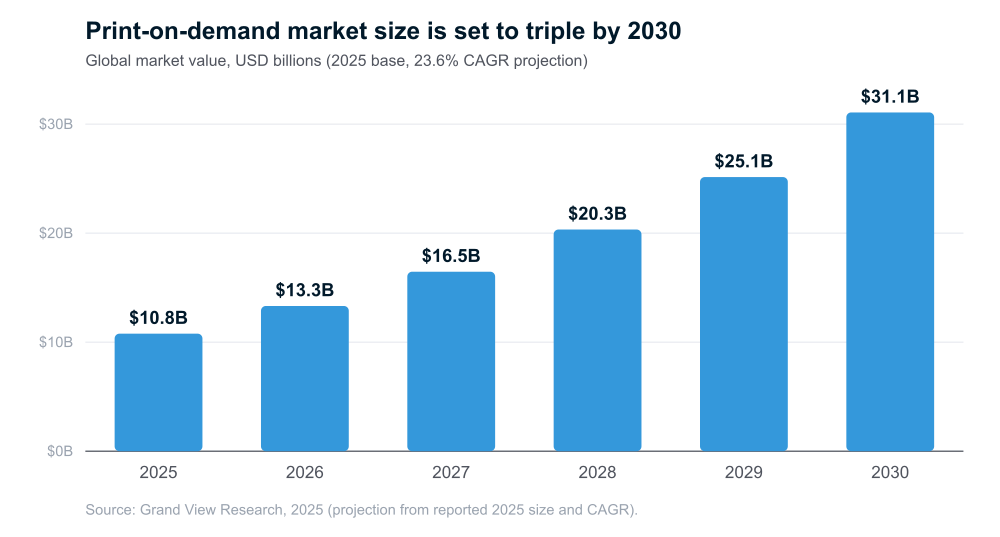
Personalization stopped being a niche years ago. Grand View Research valued the global print-on-demand market at 10.78 billion dollars in 2025 and projected a 23.6% compound annual growth rate through the decade (Grand View Research, 2025). At that rate the market roughly triples by 2030. Made-to-order also dodges the trap that crushes traditional retail: dead inventory. You produce what customers actually buy, not what you hoped they would buy, so cash isn't tied up in shelves of unsold stock.
Here is the catch. Customization raises the emotional stakes. Someone designing a gift for their mother is far more invested than someone grabbing a generic mug, and far less forgiving of a clunky tool or a sloppy result. That cuts both ways: a smooth, confident experience earns a premium, while a single point of friction sends an invested buyer straight to a competitor. So the practices below follow the buyer's journey, from the first click on your customizer to the order that lands in production.
The economics make the effort worth it. Because a personalized item is made for one specific buyer, it carries a higher perceived value and far less price sensitivity than the same blank product on a shelf. Shoppers will pay more, compare less, and return less often, as long as they trust what they are about to receive. That trust is built or broken in the buying experience, which is exactly what the following practices optimize.
11 best practices to sell more customizable products
The practices below are ordered roughly the way a customer experiences them, from the moment they open your customizer to the moment their order reaches production. You do not need all 11 live tomorrow. Pick the two or three that match where you lose the most sales today, ship those, then work down the list.
1. Lead with a real-time preview
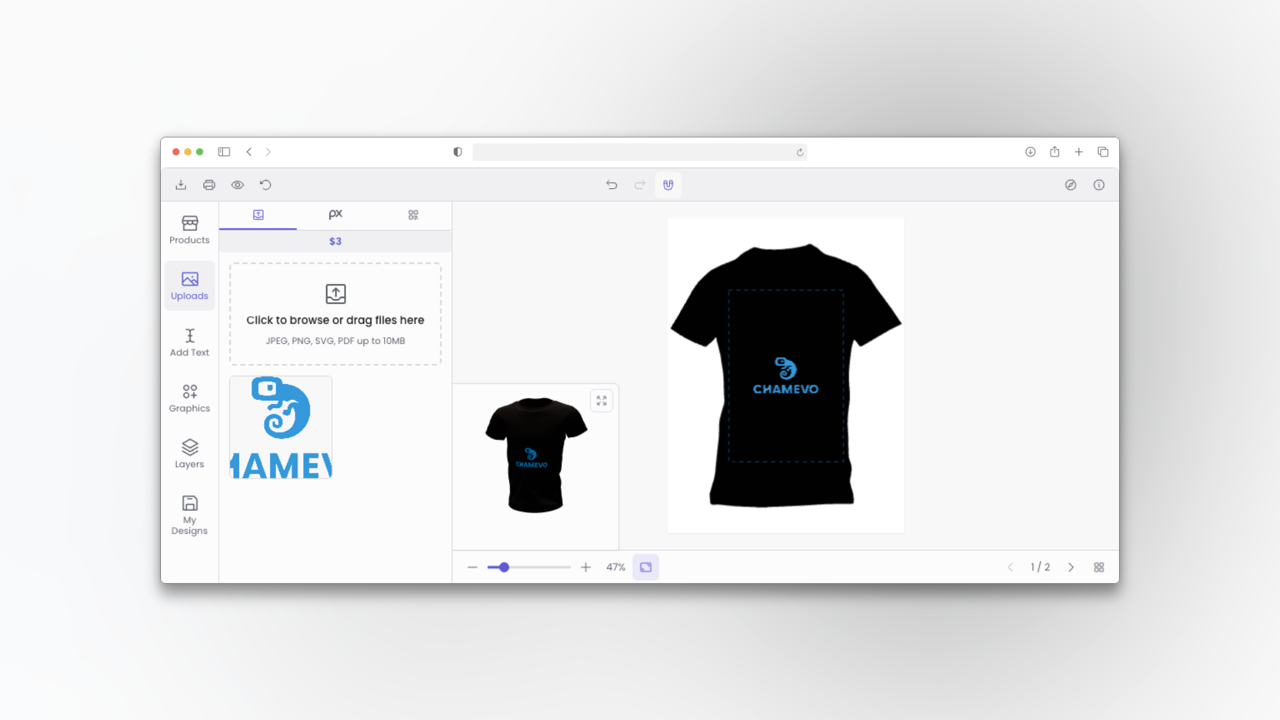
Nothing builds confidence like letting customers watch their design come together. A live 2D or 3D preview answers the only question that really matters on a custom order: "will it actually look like this?" When the answer sits right there on screen, hesitation drops and so does abandonment. Chamevo merchants who turn on 3D visualization see conversion lifts of up to 30% (Chamevo merchant data), because the preview does the persuading for you. Put the product customizer front and center on the product page, not behind a tiny "Personalize" button that most shoppers never tap.
2. Design mobile-first, not mobile-friendly
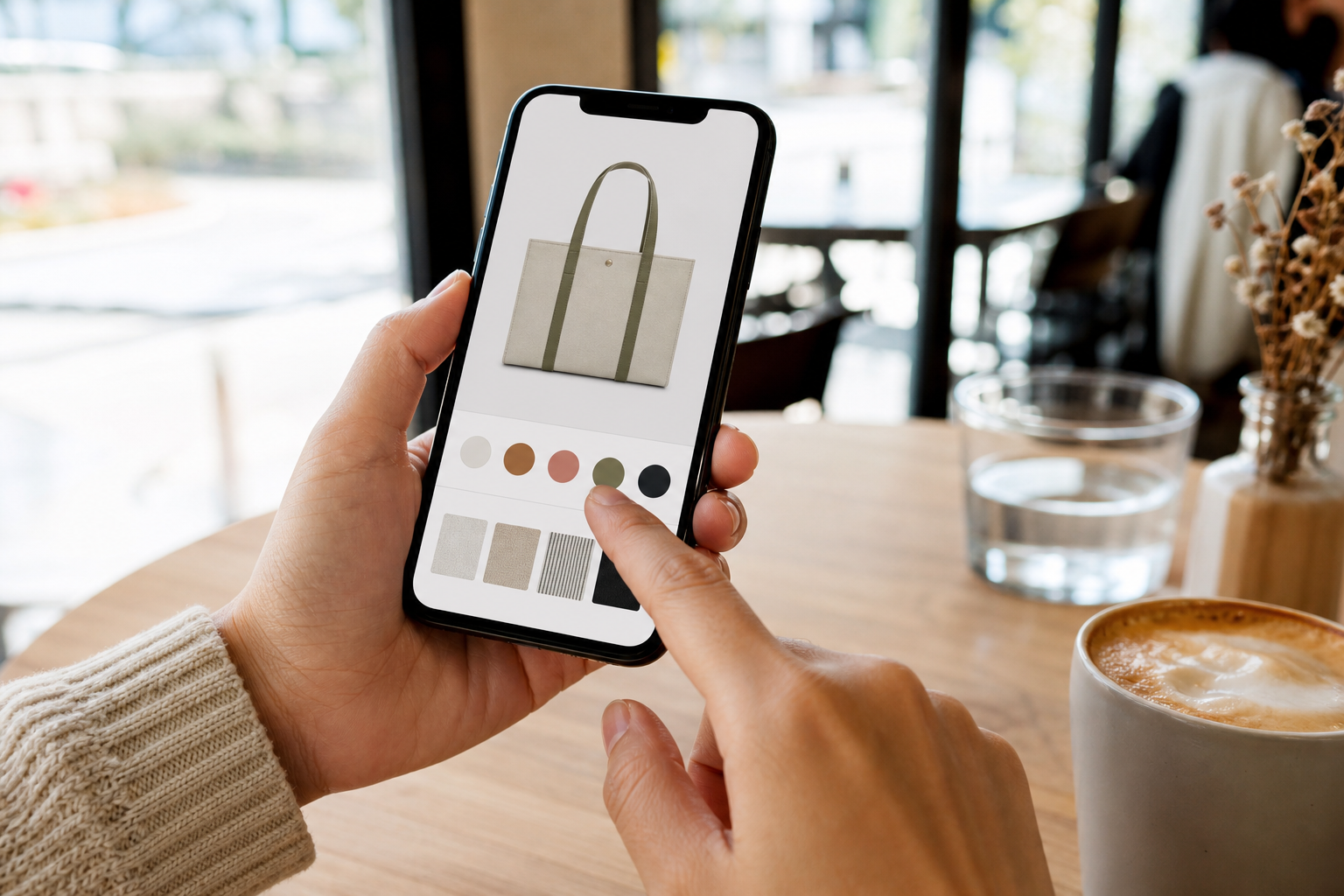
Most of your customers are designing on a phone. In our experience, 70 to 80% of customization traffic is mobile (Chamevo merchant data), yet plenty of customizers still behave like they expect a mouse. If pinch-to-zoom feels awkward, text fields are cramped, or the preview slides out of view the moment someone types, you lose the majority of buyers before they finish. Treat the phone as the primary canvas: big tap targets, a thumb-friendly toolbar, and a preview that stays put while customers edit. A customizer built mobile-first turns your largest traffic segment into your largest revenue segment, instead of your biggest drop-off.
3. Cut friction with smart defaults and templates
A blank canvas intimidates people. A starting template invites them in. Begin customers from a polished design they can tweak, pre-select the popular options, and guide them one step at a time instead of dumping every control on screen at once. Every tap you remove between "interested" and "add to cart" protects the sale. Templates pull double duty, too: they keep designs on-brand and production-safe, which means fewer broken files for you to fix and fewer surprises for the customer when the product arrives. Progressive disclosure is the principle to remember: reveal advanced options only when a customer reaches for them, so beginners feel guided and power users still feel free. A good rule of thumb is that a first-time buyer should reach "add to cart" in under a minute, even if they never open a single advanced setting.
4. Show the price as customers build
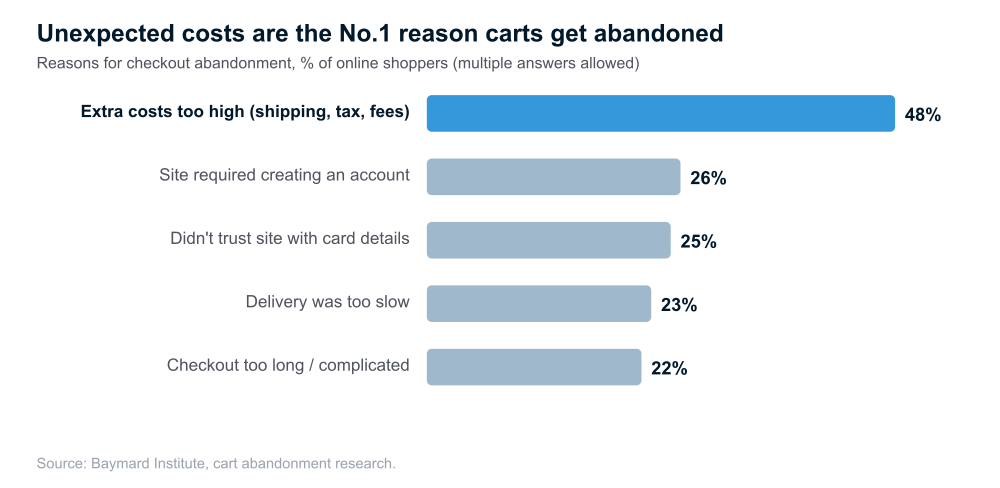
Materials, sizes, extra print areas, premium finishes: each choice should move the price right in front of the customer the moment they make it. Costs that only appear at checkout are one of the most reliable ways to lose a cart. Unexpected extra costs are the single most common reason shoppers abandon checkout, cited by 48% of users in the Baymard Institute's cart abandonment research. Dynamic pricing rules that recalculate live keep trust intact and make upsells feel like value instead of a bait-and-switch.
5. Guarantee print-ready output
One misprint can undo a dozen happy orders. The durable fix is structural, not a person squinting at files at midnight. Generate print-ready files automatically from every order, with the right CMYK profiles, bleeds, and safety zones already applied. When the file that reaches production is correct by default, reprints drop, refunds drop, and the hours you used to spend repairing customer artwork simply disappear. Reliable print quality is what separates a one-time buyer from a regular, and it is the hardest thing for a cheaper competitor to copy.
6. Rescue weak uploads with AI, don't reject them
Customers upload what they have: a low-resolution logo, a photo with a messy background, a crop that is slightly off. Rejecting the file rejects the sale. The better move is to fix it on the spot. AI background removal, automatic upscaling, and clear resolution warnings turn a dead end into a finished, printable design. That protects conversion and print quality together, and it saves your team a tedious round of "could you send a higher-res version?" emails that often go unanswered. Pair the AI fix with an honest resolution indicator: a simple green, amber, or red signal next to the upload tells the customer their image will print sharp before they commit, which prevents both abandoned designs and disappointed reviews. The goal is never to block the order, only to make sure the file behind it is one you are proud to print.
7. Merchandise the personalization itself
Show people what good looks like. Display example designs, real customer creations, and reviews so shoppers instantly understand what is possible and feel confident trying it themselves. For custom products, user-generated content is especially persuasive, because it quietly answers the question every buyer is asking: "did this turn out well for someone like me?" Seed each customizable product page with a few strong examples, then let social proof and a short "how it works" sequence carry the rest of the weight.
8. Automate fulfillment so you can actually scale
Manual file handling is the ceiling almost every custom-product store eventually hits. You can only paste so many designs into so many production tickets before growth starts to hurt and mistakes creep in. Routing each order's print-ready file to production, your printer, or cloud storage automatically removes that ceiling. Chamevo merchants cut manual work by up to 80% with workflow automation and bulk processing (Chamevo merchant data), which is exactly how a small team handles hundreds of personalized orders without hiring a single extra person.
9. Raise average order value with personalized add-ons
Personalization opens the door to upsells that feel natural rather than pushy: a matching second item, gift packaging, an upgraded material, an extra engraving. Custom buyers are already emotionally invested and less price-sensitive, so a well-placed add-on converts better here than on a standard product. Bundle complementary items, suggest the obvious pairing ("add a matching mug?"), and offer the upgrade inside the customizer, while intent is at its peak rather than after the cart is closed. Concrete example: a customer personalizing a wedding t-shirt is the perfect moment to offer matching tote bags for the bridal party or a premium fabric upgrade, both framed as making their event feel complete rather than as an extra cost. Because the buyer is already designing, the add-on reads as part of the project, not a pushy cross-sell, and that framing is what makes personalized upsells convert.
10. Make products findable for search and for AI agents
A great product nobody finds doesn't sell. Beyond classic SEO, 2026 adds a new channel: AI shopping agents that discover and compare products on a buyer's behalf. Both reward the same groundwork, namely structured product data and clear specifications. Our guide to agentic commerce and customizable products walks through how to prepare your catalog so customizable items show up in AI-driven discovery, not only in a traditional search box. Get this right early and you compound an advantage while competitors ignore the channel.
11. Run it on a platform built for custom orders
The first ten practices only stick if your store can carry them. A simple options plugin can collect a text field, but it won't give you a live preview, print-ready exports, or automated fulfillment. If you run WordPress, a purpose-built WooCommerce product customizer ties the preview, pricing rules, and production files into one workflow, so the experience customers love and the back office that keeps you sane are the same system. Choosing the right foundation is less glamorous than a new product idea, but it is what lets every other best practice compound instead of breaking under volume.
Frequently asked questions
How do I start selling customizable products on WooCommerce?
Add a product customizer plugin to your WooCommerce store, enable a live preview on the product page, set dynamic pricing rules for your options, and connect print-ready file export to your fulfillment. Start with your best-selling product, then expand once the workflow is smooth.
Do customizable products really convert better?
They can, because a real-time preview reduces purchase anxiety and personalization raises perceived value. The gain shows up only when the experience is smooth: a trustworthy preview, mobile-first design, transparent pricing, and reliable output.
What is the most common reason custom-product carts get abandoned?
Unexpected extra costs. Baymard Institute research finds 48% of shoppers abandon checkout because added shipping, tax, or fees appear too late. Showing the full price as customers build their product protects the sale.
How do I avoid misprints on personalized orders?
Generate print-ready files automatically with correct CMYK profiles, bleeds, and safety zones, and start customers from production-safe templates so the file that reaches your printer is correct by default.
Which products should I start selling customizable first?
Begin with a product you already sell well and that has a clear personalization hook, such as apparel, drinkware, or gifts. Add the customizer to that single product, get the preview, pricing, and print files working smoothly, then roll the same setup out across your catalog rather than launching everything at once.
Turn personalization into your highest-margin line
Selling customizable products in 2026 rewards stores that earn trust at every step: a preview customers believe, a mobile experience that fits their thumb, pricing they can see, and output that arrives exactly as designed. Layer automation on top and a small team can scale to hundreds of personalized orders a week without drowning in manual file work. None of it requires a bigger catalog, just a better buying experience around the products you already sell.
Ready to put these best practices to work? Add Chamevo to your WooCommerce store and start a 14-day free trial to give customers a real-time customizer with print-ready exports and automated fulfillment built in. (On Shopify instead? Chamevo is also available on the Shopify App Store.)